


Many Shopify stores launch paid campaigns without checking whether the ground beneath them is solid. The result is predictable: spend with no return, false conclusions, and the belief that ads don't work. They do work. They just don't fix what was already broken.
This article is the review you should run before hitting publish, whether on Meta Ads or Google Ads. Save it and use it every time you launch a new campaign.
The pixel and tracking: if you're not measuring right, you're not optimizing anything
The first mistake in any ads account is trusting data you haven't verified. Before you spend a single euro, confirm that your key events are firing correctly and in the right order through the funnel.
- ViewContent: should fire on every product page with the correct item ID.
- AddToCart: confirm it fires when the item is actually added to the cart, not when the product is viewed or when the button is clicked before the action completes.
- Purchase: the most critical event. It has to include the real order value and currency. Without this, conversion campaigns are optimizing blind.
For Meta, use Events Manager and its real-time event testing mode. For Google, install the Tag Assistant extension and check that conversion tags fire exactly once per purchase, with no duplicates.
If you're on Shopify and using the native Meta integration, also turn on the Conversions API (CAPI) to reduce signal loss from cookie blocking. Without clean signal, the algorithm learns the wrong lessons and your CPAs are a lie. You can dig deeper into this in our article on reliable tracking with GA4, CAPI, and UTMs.
Audiences: who you're talking to and with what data
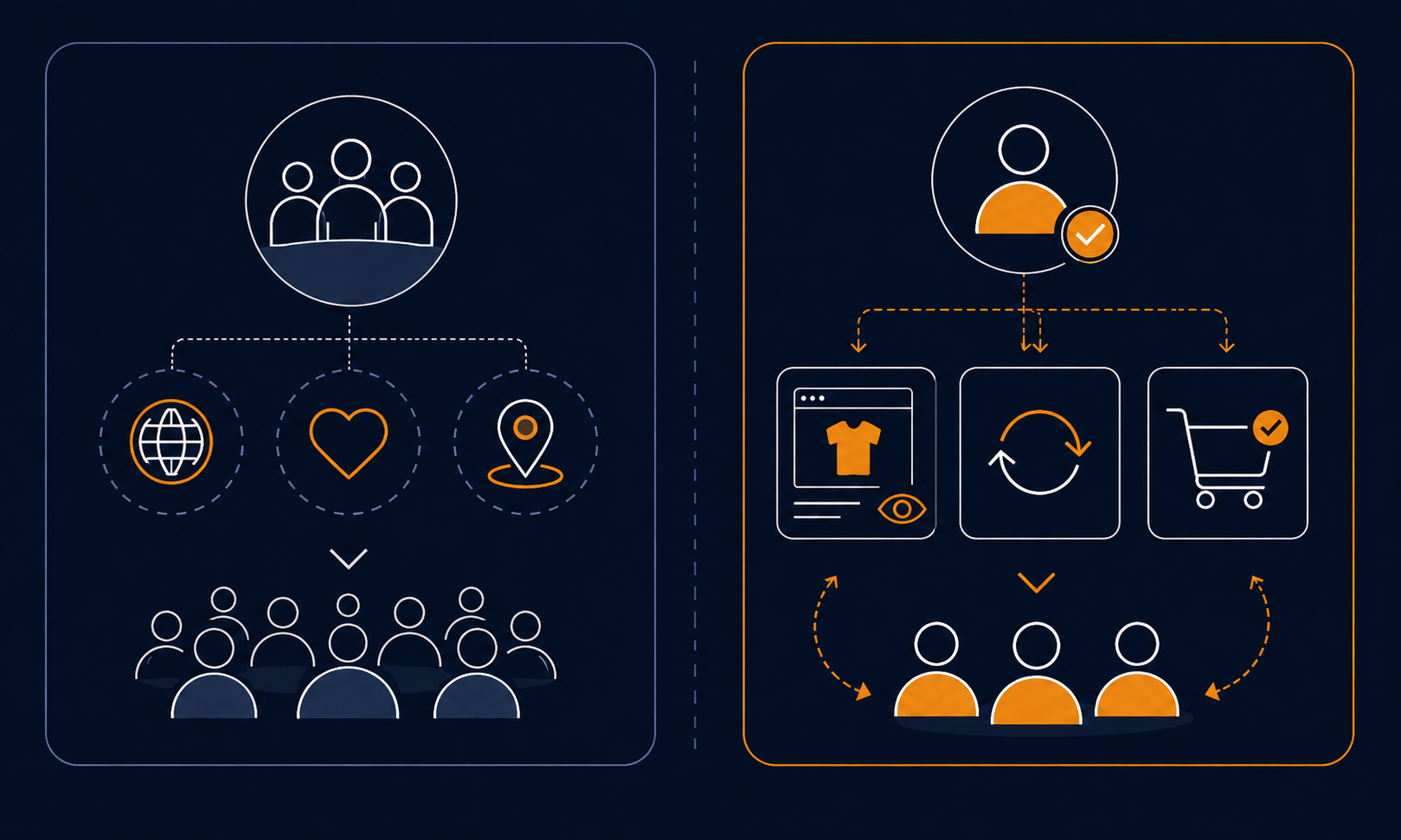
A well-built campaign aimed at the wrong audience is money down the drain. Draw a clear line between cold and warm traffic from the start, because the logic behind each one is different.
- Cold audiences (prospecting): interest-based, lookalikes built from real buyers, or broad targeting with signal. Recommended minimum for lookalikes: at least 1,000 purchase events in the last 180 days. Below that, model quality drops.
- Warm audiences (remarketing): product viewers from the last 30 days, cart adds without purchase, past buyers for cross-sell. Segment them instead of lumping them into a single campaign.
In Google, verify your remarketing lists have enough volume before using them in Performance Max or Display campaigns. A list of 50 people isn't a workable audience.
The offer: your ad can't be stronger than what you're selling
The sharpest copy can't make up for a weak value proposition. Before you write a single ad headline, answer these questions:
- Why should someone buy from you instead of Amazon, a competitor, or no one at all?
- Is your price competitive, or do you have a clear reason why it isn't?
- Do you have enough social proof, like reviews, ratings and customer numbers?
- Is the offer clear in 5 seconds to someone who's never heard of you?
A 10% discount isn't an offer. It's background noise in a feed full of 10% discounts.
If your offer can't survive the comparison, the ad will only speed up the rejection. Fix the proposition before you pay to amplify it.
Creative: the format that stops the scroll
On Meta, the creative is the targeting. The algorithm distributes your ad to the people who respond to that format and that message. If the creative is generic, the signal you get back is generic.
- Aspect ratios by placement: 9:16 for Reels and Stories, 1:1 for feed. Don't run the same asset everywhere without adapting it.
- Hook in the first 3 seconds: the first frame or the first line decides whether anyone keeps watching. Open with the problem, the consequence, or something visually unexpected.
- At least 3 variants per ad set to start. You need data to know what works, not guesses.
In Google Search, check that your headlines and descriptions cover different intent variants: informational, transactional, and comparison. An RSA where every headline says the same thing gives the algorithm no room to work.
The 3-variant rule
Always launch at least 3 distinct creatives per ad set. One leading with the problem, one with social proof, one with the product in use. Let them run for at least 7 days before deciding a winner.
Campaign structure and budget: get organized before you scale
A messy account produces data you can't interpret. Before you scale budget, you need a clean structure.
- Keep prospecting and remarketing in separate campaigns. Mix them together and you won't know what's working or what you're actually paying to acquire new customers.
- Respect Meta's learning phase: don't touch ad sets for at least 7 days after launch. Every edit resets the learning phase and extends the period of noisy data.
- Rough minimum budget to exit the learning phase: 50 conversions per ad set within 7 days. If your product costs 80 euros and your conversion rate is 1.5%, run the numbers before you launch with 5 euros a day.
In Google, be clear about whether you're in the data-collection phase (Maximize Conversions) or the efficiency phase (tCPA or tROAS). Don't switch bidding strategies before you have enough data.
The landing page: the ad doesn't convert, the page does
The ad drives traffic. The page converts. Send people to your homepage and you lose message match and purchase intent. Use product pages or dedicated landing pages that pick up exactly where the ad left off.
- Speed: check load time with PageSpeed Insights. Past 3 seconds on mobile, every additional second significantly cuts conversion.
- Message match: the landing page headline should echo the promise made in the ad. If the ad says "Free shipping in 24h," that needs to be visible above the fold on the landing page.
- Visible conversion elements: clear price, buy button, reviews, and guarantee, all accessible without having to hunt for them.
If you want to improve your conversion rate without redesigning the entire store, check out our article on how to improve Shopify conversion without a redesign.
The final checklist: 10 questions before you hit Publish
- Are the ViewContent, AddToCart, and Purchase events firing correctly and without duplicates?
- Is CAPI active and sending server-side data to Meta?
- Do you have at least 1,000 purchases in the last 180 days to build a usable lookalike?
- Are prospecting and remarketing in separate campaigns?
- Do you have at least 3 distinct creatives per ad set?
- Does each creative's hook work in the first 3 seconds with the sound off?
- Does the landing page load in under 3 seconds on mobile?
- Do the ad message and the landing page message match?
- Is your budget enough to exit the learning phase within 7 days?
- Is the offer competitive, or is there a clear reason it isn't?
Ads don't fix a broken funnel. Fix the fundamentals and your ad spend starts multiplying on its own. If you want us to review your account before you scale, tell us where you're at and we'll tell you what we'd change first.

Juan Jüncter
Founder & Operator · ReadyCart
Founder of ReadyCart. Builds Shopify stores, runs Google and Meta spend, and sets up the measurement that makes every decision verifiable.
Work with ReadyCart


Get tactics like this every week
Practical content for Shopify brand owners who want to grow with strategy, not luck.